Buyer's guide
3D printer buyer's guide
How to choose a 3D printer in the UK: start with what you want to print, then decide on colours, size and budget. Every fact here comes from the printers' checked specs, and every price is live.
- printers checked
- 76
- models in stock
- 19
- cheapest today
- £149
By James @ SpoolDeal · Last reviewed
The short version
- 1. Pick the toughest material you'll want and buy a printer that prints it as it comes. ABS, ABS-CF, ASA, Nylon and PC need an enclosure.
- 2. Want colours? Buy a printer that works with a multi-colour unit; a combo includes it, usually for less.
- 3. Don't pay for size you won't use. A plate around 25 cm across suits most prints.
- 4. Judge the price by its history, not a "was" price. We only call it a deal when it's below what the printer has actually cost.
Chapter 1
How to choose a 3D printer
Decide what you want to print first: it settles most of the rest. Then choose colours, size and how much setting up you're happy to do.
What will you print?
This decides more than anything else. Models, toys and prototypes print on anything; parts that live outdoors, near heat or under load need a printer that can handle tougher materials. Pick the toughest material you're likely to want and buy a printer that prints it as it comes.
One colour or several?
Most printers print one filament at a time, and you swap reels by hand. A multi-colour unit feeds several reels into one print. If you want it, check the printer works with one, and whether a combo (printer and unit together) costs less than buying the unit later.
How big are your prints?
The build volume is the biggest single part it can make. Most people are well served by a plate around 25 cm across; smaller printers suit desks and small parts, bigger ones cosplay, helmets and storage. Big parts can often be split and glued, so don't pay for size you won't use.
Where will it live?
An enclosed printer is quieter, keeps dust and draughts off the print and keeps curious hands (and pets) away from hot parts. An open-frame printer needs more room around it, because on most the bed moves back and forth.
How much do you want to tinker?
Modern printers level their own beds, calibrate themselves and print from an app. Older and cheaper designs can need more setting up. If you want to print rather than tinker, favour a printer that sets itself up.
Chapter 2
Our picks right now
If you'd rather start from a shortlist, these are the printers we'd pick today, chosen from their checked specs and today's in-stock prices.

Prints PLA and PETG, the two materials most people start with, as it comes, for under £300.
- PLA prints as it comes
- PETG prints as it comes
- TPU prints as it comes
- ABS needs an upgrade
- ASA needs an upgrade
- Carbon fibre needs an upgrade
Skip it if you want ABS or ASA parts: they need an enclosure, and it's open-frame.

The cheapest way in that still prints PLA, PETG and TPU as it comes.
- PLA prints as it comes
- PETG prints as it comes
- TPU prints as it comes
- ABS needs an upgrade
- ASA needs an upgrade
- Carbon fibre needs an upgrade
Skip it if you want multi-colour prints: it has no multi-colour unit.

Up to 4 colours in one print, for less than any other printer we list that does 4 or more.
- PLA prints as it comes
- PETG prints as it comes
- TPU prints as it comes
- ABS needs an upgrade
- ASA needs an upgrade
- Carbon fibre prints as it comes
Skip it if you want ABS or ASA parts: they need an enclosure, and it's open-frame.
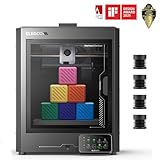
Prints all 11 materials we cover as it comes, ABS, ASA and carbon fibre included, for the lowest price we list.
- PLA prints as it comes
- PETG prints as it comes
- TPU prints as it comes
- ABS prints as it comes
- ASA prints as it comes
- Carbon fibre prints as it comes
Skip it if you want multi-colour prints: it has no multi-colour unit.

A 350 × 350 mm plate and 42.9 litres of build volume: the most per pound of any big printer we list.
- PLA prints as it comes
- PETG prints as it comes
- TPU prints as it comes
- ABS prints as it comes
- ASA prints as it comes
- Carbon fibre prints as it comes
Chapter 3
What do you want to print?
Almost every printer handles the everyday materials. The ones that decide the printer are ABS, ABS-CF, ASA, Nylon, PC and PLA Glow: check what each needs before you buy.
What each material asks of a printer
| PLA | Any printer | 76 of 76 |
|---|---|---|
| PLA Glow | A hardened nozzle | 27 of 76 |
| PLA-CF | A hardened nozzle | 27 of 76 |
| PETG | An enclosure helps | 76 of 76 |
| PETG-CF | An enclosure helps and a hardened nozzle | 27 of 76 |
| ABS | An enclosure and a bed of 90°C or more | 30 of 76 |
| ABS-CF | An enclosure, a hardened nozzle, a hotend of 250°C or more and a bed of 90°C or more | 18 of 76 |
| ASA | An enclosure and a bed of 90°C or more | 30 of 76 |
| Nylon | An enclosure | 30 of 76 |
| TPU | Direct drive is best; not through a multi-colour unit | 76 of 76 |
| PC | An enclosure, a hotend of 250°C or more and a bed of 90°C or more | 30 of 76 |
Counts are the 76 printers whose specs we've checked, compared with what each material needs; click one to see those in stock.
Not sure which material you need? The filament buyer's guide compares them, and each printer's filament guide lists what it prints.
Chapter 4
Open frame, enclosed or heated chamber
You need an enclosure only for ABS, ABS-CF, ASA, Nylon and PC. For everything else an open frame prints just as well, but an enclosure is quieter and keeps dust off.
Open frame
The print sits in the open air. Cheapest, easy to reach into and fine for the everyday materials, but draughts and room temperature affect the materials that shrink as they cool.
12 in stock from £149
Enclosed
Panels and a lid keep the warm air around the print, so shrinking materials don't warp or crack. Also quieter, and it keeps dust out. Ventilate the room, or use the filter, when printing the materials that give off fumes.
4 in stock from £209
Heated chamber
A heater keeps the inside at a set temperature, for engineering materials that need steady warmth through a long print. Mostly worth it if you print those regularly.
3 in stock from £719
Chapter 5
Multi-colour printing and combos
A multi-colour unit feeds several reels into one print. 46 of the 76 printers we've checked work with one, up to 16 colours; a combo has it in the box.
How it works
The unit holds several reels and feeds the one the print needs. When the colour changes, the printer pushes out the old filament before carrying on, so each change takes time.
Combo or later?
A combo listing includes the unit and usually costs less than buying the two separately. If you're not sure you'll use it, buy a printer that works with one and add it later.
It wastes some filament
Every change purges a little filament (the 'poop'), and a print with many changes can waste a lot. Printing several copies at once, or purging into infill, cuts it down.
Not every material goes through it
Flexible filament jams in most units: print it from the spool holder on the back instead. Cardboard spools can slip in some units; a printed adapter ring helps.
The cheapest combo we list today: Creality SPARKX i7 Combo, £319.
Chapter 6
Nozzles and hotends
PLA Glow, PLA-CF, PETG-CF and ABS-CF wear out ordinary nozzles, so they need a hardened one. 27 of the 76 printers we've checked come with one.
Brass
Conducts heat well and prints the everyday materials beautifully, but wears out quickly with abrasive filaments.
Stainless steel
Tougher than brass and common on newer printers, but still not meant for abrasive filament over the long run.
Hardened steel
Resists wear from carbon-fibre, glass-fibre and glow-in-the-dark filaments. Some printers come with one; on others it's a cheap upgrade.
Hotend temperature
The hottest the nozzle can go limits which materials it can melt. Engineering materials need a hotter hotend than the everyday ones.
Chapter 7
Bed-slinger or CoreXY, speed and size
How the printer moves decides its speed, footprint and whether it fits in an enclosure. 21 of the printers we've checked have a plate 30 cm or more across, for big prints.
Bed-slinger
The bed moves front to back while the head moves side to side. Simple, cheap and easy to maintain, but it needs space behind and in front, and tall prints wobble at high speed.
CoreXY
The head moves in both directions over a bed that only moves down. Faster and steadier at speed, and it fits in a box, so most enclosed printers are CoreXY.
Speed claims
Top speed is what the head can do, not how fast a real print finishes: acceleration, cooling and the material decide that. Treat the headline number as a rough guide.
Direct drive or Bowden
A direct-drive extruder sits on the head and pushes filament a short way, which suits flexible filament. A Bowden tube keeps the head light but makes flexible filament harder to print.
Chapter 8
What your money buys
What each budget buys on Amazon UK and Eryone UK today, from the printers in stock. Spend enough to print the toughest material you'll want as it comes, and no more.
What your money buys today
| Under £200 | 2 | 0 of 2 | 1 of 2 | 3 of 11 | Creality Ender 3 V3 SE, Bambu Lab A1 Mini |
|---|---|---|---|---|---|
| £200 to £350 | 5 | 1 of 5 | 4 of 5 | 11 of 11 | Elegoo Centauri Carbon, Bambu Lab A1 |
| £350 to £600 | 5 | 3 of 5 | 4 of 5 | 11 of 11 | Elegoo Centauri Carbon 2, Creality K1C |
| £600 and up | 7 | 3 of 7 | 6 of 7 | 11 of 11 | Prusa Research Original Prusa MK4S, Anycubic Kobra S1 Max |
Live: the in-stock printers we list, by their lowest price; examples are the best deals in each band.
Chapter 9
Budget for the extras
Leave room in the budget for filament and a few spares; they're what keep a printer printing.
Filament
Printers come with a sample reel at most. Budget for two or three reels to start; the filament buyer's guide has what each material should cost.
A spare build plate
Plates wear and scratch. A spare (or a different surface, such as textured PEI for PETG) keeps you printing.
A dryer
Filament soaks up moisture from the air and prints badly when it's wet. A dryer matters most for the materials that absorb it fastest.
Nozzles
Nozzles are consumables. Keep a spare, and a hardened one if you'll print abrasive filament on a printer that doesn't have one.
Chapter 10
When to buy
Printers are cheapest in the big sales; Black Friday is next on 27 November 2026. Whenever you buy, check the price against its history.
Big sales
Printers drop most in the big sales, Prime Day in the summer and Black Friday in November, and makers often cut prices when a new model arrives.
Judge a deal by its history
A 'was' price on a listing isn't proof of a saving. We compare today's price with what each printer has actually cost over the last 90 days, and only call it a deal when it's below that.
Set an alert
If there's no hurry, set a price alert on the printer you want and we'll email you when it drops.
Waiting for cheaper printers?
Open any printer and set the price you want to pay. We check it through the day and email you when it gets there. Free, and you can switch it off any time.
Chapter 11
Glossary
The terms you'll meet on printer listings and throughout this guide, in plain English.
- AMS, CFS, ACE, IFS
- Makers' names for their multi-colour units (Bambu Lab, Creality, Anycubic, Flashforge), which feed several reels into one print.
- Combo
- A printer sold with its multi-colour unit in the box.
- Build volume
- The largest part a printer can make, width × depth × height.
- Bed-slinger
- A printer whose bed moves front to back under the head (also called an i3-style printer).
- CoreXY
- A motion system where the head moves in both directions over a bed that only moves down.
- Enclosure
- Panels and a lid around the print, keeping in warm air and keeping out draughts and dust.
- Heated chamber
- An enclosure with its own heater, for materials that need steady warmth.
- Hotend
- The part that melts the filament; its top temperature limits which materials it can print.
- Hardened nozzle
- A steel nozzle that resists wear from abrasive (filled) filament.
- Direct drive
- An extruder on the print head, pushing filament a short way into the hotend; best for flexible filament.
- Bowden
- An extruder on the frame that pushes filament through a tube to the hotend.
- Auto levelling
- The printer measures the bed and adjusts for it, so you don't level it by hand.
- Purge
- Filament pushed out between colours in a multi-colour print.
- Slicer
- The software that turns a 3D model into the instructions a printer follows.
Chapter 12
3D printer buying FAQ
Quick answers to the questions people ask most before they buy a 3D printer.
What is the best 3D printer for a beginner?
Right now we'd start with the Bambu Lab A1 Mini: it prints PLA and PETG as it comes and costs £157 on Amazon UK and Eryone UK. More generally, choose one that levels its own bed and prints PLA and PETG without upgrades.
Do I need an enclosed 3D printer?
Only if you'll print ABS, ABS-CF, ASA, Nylon and PC, which warp and crack in a draught. Everything else prints well on an open frame, though an enclosure is quieter and keeps dust off.
Can any 3D printer print carbon fibre filament?
PLA Glow, PLA-CF, PETG-CF and ABS-CF are abrasive and wear out brass and stainless nozzles, so you need a hardened nozzle. 27 of the 76 printers we've checked come with one; on most others it's a cheap upgrade.
Is a combo worth it?
If you want multi-colour prints, usually yes: the unit costs less in a combo than on its own. The cheapest combo we list today is the Creality SPARKX i7 Combo at £319. If you're not sure, buy a printer that works with one and add it later.
How much should I spend on a first 3D printer?
Printers we list start at £149 on Amazon UK and Eryone UK. Spend enough to print the toughest material you'll want as it comes; the budget table in this guide shows what each price band buys today.
When are 3D printers cheapest?
In the big sales (Prime Day and Black Friday, next on 27 November 2026) and when a maker launches a new model. We compare every price with what the printer has cost over the last 90 days, so a deal here is a real one.
Where these numbers come from
Printer capabilities are each maker's published specs, and we only count a printer once we've checked them. What a material needs comes from manufacturers' data sheets, and "prints it as it comes" compares the two, the same way every printer guide on the site does. Prices are live from Amazon UK and Eryone UK and deals are judged against our own 90-day price history. Written and reviewed by James @ SpoolDeal; last reviewed 1 October 2026.